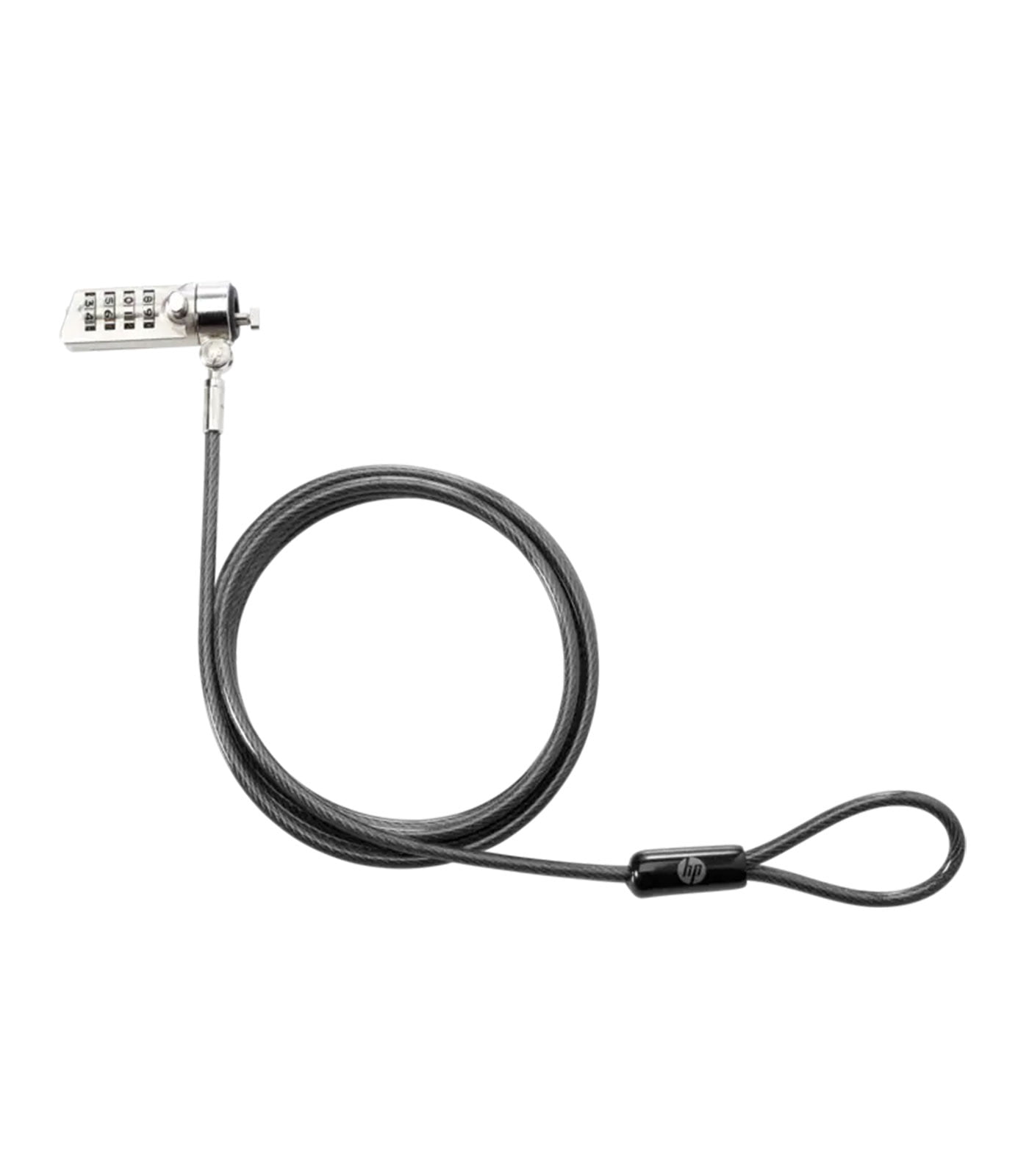
 In today’s tech-driven world, securing laptops, tablets, and other essential devices is crucial, especially for those who often work in shared spaces like offices, libraries, or co-working environments. One efficient, convenient, and reliable way to protect your devices is the HP Essential Combination Lock. In this article, we’ll explore the features, benefits, and practical use cases for this security tool, which has become a popular choice for those seeking an easy-to-use, dependable security solution. The HP Essential Combination Lock is designed to secure your HP laptops, monitors, and other tech equipment. Featuring a combination lock mechanism, it eliminates the need for keys, making it a practical choice for professionals, students, and business travelers. This lock is engineered to fit seamlessly with various HP devices, and its compact, lightweight design makes it easy to carry wherever you go.
Key Features of the HP Essential Combination Lock
The HP Essential Combination Lock boasts several features that set it apart from other security solutions: 4-Digit Combination Code: The lock uses a 4-digit code, providing 10,000 possible combinations. This code is user-settable and can be easily changed whenever necessary. Tough Cable Material: The lock’s cable is made of cut-resistant materials, adding a robust layer of protection to discourage tampering and unauthorized access. Universal Fit: While designed specifically for HP products, the lock is compatible with other brands as well, provided the device has a standard security slot. Compact and Lightweight: With a minimalist design, it’s easy to carry in a bag or laptop case without adding bulk. No Keys Required: The combination mechanism eliminates the need for a key, which is beneficial if you’re prone to losing or misplacing small items.
Benefits of Using the HP Essential Combination Lock
Investing in a combination lock offers various benefits that protect both your devices and your peace of mind: Enhanced Security: With a high-tensile steel cable and a sturdy lock head, the HP Essential Combination Lock provides a physical barrier against theft. Ease of Use: Setting and resetting the combination is simple, allowing for a quick setup without the hassle of keys. Flexibility in Shared Spaces: This lock is particularly useful in shared environments where securing your device is essential, such as libraries, coffee shops, or co-working spaces. Protects Valuable Data: Beyond the device itself, this lock secures sensitive data from potential theft, which can be more valuable than the hardware. Long-Lasting Build Quality: Built with durable materials, this lock is designed to withstand years of use, even in busy, high-traffic areas.
Setting Up and Using the HP Essential Combination Lock
Setting up the HP Essential Combination Lock is a straightforward process: Choose Your Code: The lock comes with a pre-set combination that you can change. Select a combination that you’ll remember but is difficult for others to guess. Attach the Lock: Insert the lock head into your device’s security slot. Once it’s inserted, rotate it to secure it in place. Loop the Cable: Wrap the cable around a fixed, sturdy object, such as a table leg or desk frame. Ensure that the object is heavy or fixed enough that it can’t be easily moved. Secure the Lock: Double-check that the combination is set and the lock is secure. The cable should be taut, limiting the device’s movement. Lock and Go: With your device locked, you can leave it unattended with confidence that it is well-protected.
Ideal Use Cases for the HP Essential Combination Lock
The HP Essential Combination Lock offers versatile applications across different environments and scenarios: Office Spaces: Whether working in an open office or a shared co-working environment, this lock secures your laptop and other tech equipment during breaks or meetings. Educational Institutions: For students and educators who frequently use shared spaces like libraries or study areas, the lock provides a reliable way to secure devices. Business Travel: When working remotely from hotels, cafes, or other public places, the HP lock ensures peace of mind, especially when moving away from your device for brief periods. Events and Conferences: At conventions, trade shows, and other professional gatherings, the HP lock allows exhibitors and attendees to secure their devices when they step away. Home Use: For households with multiple users or young children, the lock can prevent unauthorized access or accidental tampering with devices.
Comparison with Other Security Solutions
When choosing a security lock for your device, it’s essential to consider the various options available. Here’s how the HP Essential Combination Lock compares with other solutions: Keyed Locks vs. Combination Locks: Unlike keyed locks, the combination mechanism doesn’t require a physical key, which can be lost or duplicated. The 4-digit code provides a high level of security while being easy to use. Physical Locks vs. Software-Based Security: While software security measures like passwords and biometric scans protect digital data, physical locks prevent hardware theft. A combination of both provides comprehensive protection. Basic Cable Locks vs. High-Tensile Cables: Some locks use basic cables that can be easily cut. The HP Essential Combination Lock uses a high-tensile, cut-resistant cable, offering a superior level of physical protection.
Tips for Maximizing the Effectiveness of Your HP Essential Combination Lock
To get the best security for your devices, consider these tips: Change the Code Regularly: Updating your combination every few months is a good practice, especially if you frequently use the lock in public spaces. Select an Unpredictable Combination: Avoid common combinations (like 1234 or 0000) and choose something unique. Regularly Inspect the Lock and Cable: Over time, wear and tear can impact the lock’s effectiveness. Periodically inspect the lock and cable for any signs of damage or tampering. Use Alongside Other Security Measures: A physical lock complements digital security measures, so always use passwords, device encryption, and secure your accounts with multi-factor authentication (MFA).