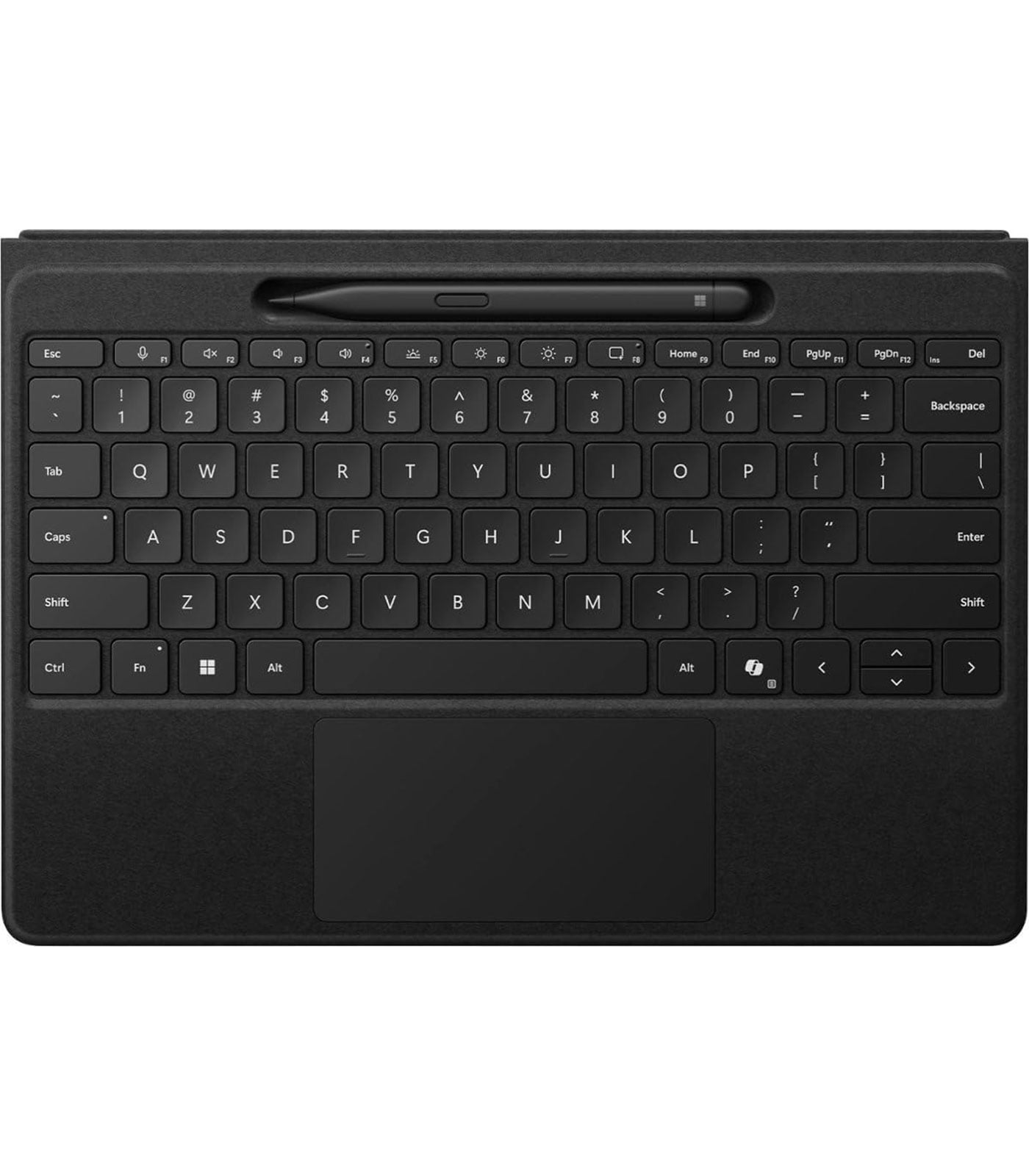
Microsoft Surface Pro Flex Keyboard with Slim Pen Black Y8U-00001
Microsoft Surface Pro Flex Keyboard with Slim Pen Black Y8U-00001
Description
Features
The Microsoft Surface Pro Flex Keyboard with Slim Pen in Black (Model Y8U-00001) is a modern, premium accessory designed to expand the capabilities of the Surface Pro lineup. Combining cutting-edge design, exceptional tactile feedback, wireless functionality, and seamless integration with the Surface Slim Pen, it represents the evolution of productivity-focused accessories in the Surface ecosystem. As Microsoft continues to refine its vision for a hybrid computing experience, the Flex Keyboard is a key component that enhances user interaction, comfort, and versatility—whether working at a desk, on a couch, or on the go.
Premium Build and Design
The Surface Pro Flex Keyboard carries forward Microsoft’s signature approach to sleek, functional aesthetics. The Black colorway adds a professional, understated elegance that matches the overall design language of the Surface Pro devices. Its build quality features a high-grade Alcantara covering, which is soft to the touch and resists wear over time, giving the keyboard a luxurious, durable finish. The full-size keyboard layout is optimized for comfort, with well-spaced keys that provide excellent tactile feedback. A large precision glass trackpad enhances navigation, supporting multi-touch gestures and delivering a responsive experience similar to traditional laptops. This combination of high-quality materials and intelligent design makes the keyboard both attractive and practical.
Wireless and Detachable Innovation
What sets the Surface Pro Flex Keyboard apart from other Surface keyboards is its wireless functionality. Unlike earlier Type Covers that only operated when physically connected to the Surface Pro, the Flex Keyboard can function wirelessly via Bluetooth, offering users the freedom to detach the keyboard and position it as desired. This opens up entirely new workflows, such as propping up the Surface Pro on a stand while using the keyboard in your lap, or separating the keyboard for a more ergonomic desk setup. The inclusion of a built-in rechargeable battery ensures long hours of uninterrupted productivity, and the keyboard charges automatically when connected to the Surface Pro or via a USB-C connection.
Magnetic Attachment and Pen Storage
Another standout feature of the Surface Pro Flex Keyboard is its ability to securely attach magnetically to the Surface Pro. This ensures that the keyboard stays in place when not used wirelessly and still supports the familiar typing angle that users are accustomed to. Integrated into the keyboard is a dedicated slot that securely houses the Surface Slim Pen, offering convenient charging and storage in one sleek package. This magnetic charging cradle not only ensures that your Slim Pen is always charged and within reach but also provides a sense of cohesion and minimalism that aligns with Microsoft’s overall design philosophy.
Slim Pen Compatibility and Inking Experience
The included Surface Slim Pen (2nd Generation) enhances the appeal of the Surface Pro Flex Keyboard. With haptic feedback and low-latency response, the Slim Pen offers an exceptional writing and drawing experience, ideal for note-taking, sketching, and professional-grade digital illustration. It features tilt and pressure sensitivity, making it versatile for both artistic use and precise annotations. Thanks to its integration with Microsoft’s Windows Ink and Surface hardware, it delivers seamless functionality across a wide range of apps including OneNote, Whiteboard, Adobe Fresco, and more. The Flex Keyboard and Slim Pen combo is tailored for creative professionals, students, and business users who demand precision, speed, and reliability from their input tools.
Enhanced Typing and Productivity
Typing on the Surface Pro Flex Keyboard is a delight. The scissor switch key mechanism offers quiet operation with satisfying key travel, reducing fatigue during long typing sessions. Each key is backlit, enabling effective use in low-light environments, whether you’re in a lecture hall, a late-night editing session, or simply catching up on emails during a red-eye flight. The larger trackpad is significantly improved over previous models, giving users a more accurate, smooth, and intuitive navigation experience. With full Windows precision touchpad support, gestures such as pinch-to-zoom, three-finger swipe, and multi-finger tab switching are all responsive and fluid. These refinements contribute to making the keyboard not just a detachable accessory but a genuine laptop-grade tool for serious productivity.
Seamless Integration with Surface Devices
This keyboard is specifically engineered for compatibility with the latest Microsoft Surface Pro models, especially the Surface Pro 9 and future forward-compatible devices in the same lineage. The seamless integration means users get automatic pairing and charging when connected, as well as intelligent settings recognition that adapts to the device’s needs. For instance, the keyboard can automatically disable the trackpad while typing to prevent accidental cursor movement. Furthermore, system-level integration allows for firmware updates and customization through the Surface app, giving users control over features like key remapping and pen pressure curves.
Portability and Versatility
Designed with mobility in mind, the Surface Pro Flex Keyboard is incredibly slim and lightweight, making it easy to carry in a bag or backpack. Despite its slim profile, it doesn’t sacrifice strength or functionality. The wireless operation frees users from the limitations of being physically tethered to the Surface Pro, creating a more fluid and adaptable computing environment. Whether you’re using your Surface Pro at a café, on a train, or at a client presentation, the Flex Keyboard adapts to your needs. It’s ideal for professionals who move frequently between locations, creatives who sketch or write in various positions, and students who need flexibility during lectures and study sessions.
Security and Durability
The keyboard is constructed with longevity in mind. Its Alcantara fabric resists stains and spills, while the keyboard itself is rated for thousands of keystrokes, ensuring durability even under heavy daily use. The pen garage doubles as a charging dock and keeps your stylus secure, reducing the risk of misplacement. For enterprise and educational users, the keyboard supports enterprise-level encryption for secure Bluetooth connectivity, helping ensure data integrity and device protection during wireless use.
Accessibility and User-Friendly Features
Microsoft has made strides in accessibility across its product range, and the Surface Pro Flex Keyboard reflects that commitment. The keyboard includes tactile cues on specific keys for visually impaired users and supports Windows’ full suite of accessibility tools, including voice typing, sticky keys, and magnifier compatibility. The Slim Pen’s ergonomic design ensures that it can be comfortably used by a wide range of users, including those with grip challenges or dexterity issues. These inclusive design choices make the keyboard suitable for broader use in educational institutions, collaborative environments, and accessibility-conscious organizations.
Use Cases and Audience
The Microsoft Surface Pro Flex Keyboard is targeted at a wide range of users, from creatives and students to corporate professionals and tech enthusiasts. Artists will love the Slim Pen’s drawing capabilities combined with the keyboard’s portability, allowing for flexible sketching on-the-go. Writers and students benefit from the quiet, satisfying typing experience and responsive trackpad. Business users can rely on the robust wireless connectivity and sleek design during travel or presentations. The ability to easily switch from a workstation setup to a tablet-style interface also makes the Flex Keyboard perfect for hybrid work scenarios, remote meetings, and co-working setups.
Software Enhancements and Customization
Through the Microsoft Surface app and Windows 11’s native tools, users can personalize the keyboard and pen settings. Adjusting the pen’s haptic feedback, assigning shortcut keys, or setting handwriting preferences can make the interaction feel even more personal and efficient. Firmware updates delivered via Windows Update ensure that your keyboard and pen are always running optimally. The Flex Keyboard is also fully compatible with Microsoft 365 and other professional applications, integrating tightly with tools like Teams, Excel, Word, and OneNote to offer a full-featured, cohesive productivity platform.
Battery Life and Charging
Battery life is another area where the Flex Keyboard excels. When used wirelessly, the built-in battery lasts for days of regular use, and recharges quickly through its USB-C port or by snapping it back onto the Surface Pro. The Slim Pen 2 also features fast charging, giving you hours of use from just a few minutes of charge. LED indicators provide feedback on battery levels for both the keyboard and the pen, so you’re never caught off-guard by low power. The thoughtful battery design reinforces Microsoft’s focus on dependable, user-friendly accessories.
Ecosystem Synergy
 As a core component of the Surface ecosystem, the Flex Keyboard perfectly complements other Microsoft hardware and services. Whether you’re pairing it with a Surface Dock for multi-monitor productivity or integrating with Microsoft’s adaptive accessories, the Flex Keyboard plays a central role in a connected, adaptable work or creative setup. Its compatibility with Surface Pro Signature Covers and Surface Adaptive Kit ensures that it can be customized and extended for even more use cases. The synergy across hardware and software underscores Microsoft’s holistic approach to device design and ecosystem support.
Environmental Considerations
Microsoft continues to show environmental responsibility in the production of Surface accessories, and the Flex Keyboard is no exception. It is crafted using partially recycled materials and is packaged in eco-friendly packaging that meets global environmental standards. The longevity of the product also contributes to sustainability, as users can rely on a long lifecycle that reduces the need for frequent replacement. Microsoft’s investment in repairability, responsible sourcing, and energy-efficient production makes this accessory a solid choice for eco-conscious consumers and businesses.
The Microsoft Surface Pro Flex Keyboard with Slim Pen (Model Y8U-00001) is more than just a peripheral—it’s a transformative productivity tool that extends the functionality and versatility of the Surface Pro lineup. It provides a near-laptop typing and navigation experience, wireless freedom, seamless pen integration, and thoughtful design that aligns with professional and creative workflows alike. Whether you’re sketching a design, typing a thesis, annotating a PDF, or running a business meeting from your Surface Pro, this accessory ensures you can do it with precision, comfort, and style. With innovation at its core, this keyboard-pen combo stands as a testament to Microsoft’s dedication to crafting tools that empower users to do more, wherever they are.