
Apple iPad Air M4 (2026) 13 Inch 128GB WiFi – Blue
Apple iPad Air M4 (2026) 13 Inch 128GB WiFi – Blue
Description
Features
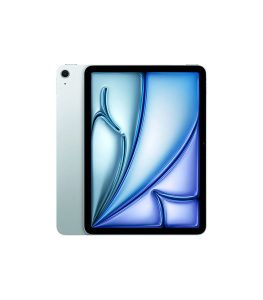 The Apple iPad Air M4 (2026) 13-inch model continues Apple’s tradition of balancing premium build quality with lightweight portability, positioning itself between the standard iPad and the Pro lineup. The chassis is expected to retain the sleek aluminum unibody design, which not only enhances durability but also maintains a thin and light profile suitable for students, professionals, and creators who need mobility. The Blue finish adds a modern and slightly expressive tone compared to more conservative colors, making it visually appealing without being overly flashy. At 13 inches, the device feels more like a hybrid between a tablet and a productivity machine, especially when paired with accessories like the Magic Keyboard or Apple Pencil. Despite the larger screen size, Apple’s engineering ensures that the device remains comfortable to hold in landscape mode for extended reading, drawing, or media consumption sessions. The placement of buttons, speakers, and USB-C port remains intuitive, allowing users to adapt quickly regardless of whether they are upgrading from a smaller iPad or switching from a laptop. Overall, the design philosophy focuses on minimalism, durability, and productivity readiness while keeping the device visually elegant and lightweight in everyday use.
Display Quality and Liquid Retina Experience
The 13-inch Liquid Retina display is one of the defining highlights of the Apple iPad Air M4 (2026), offering a resolution of 2732 x 2048 that delivers exceptional clarity, sharpness, and color accuracy. With a brightness level of up to 600 nits, the screen performs well in both indoor and moderately bright outdoor environments, making it versatile for different usage conditions. The Liquid Retina technology ensures smooth color transitions, reduced glare, and consistent viewing angles, which is especially important for digital artists, video editors, and content consumers. Text appears crisp, images look detailed, and videos feel immersive due to the large screen real estate combined with high pixel density. Whether you are editing documents, watching high-resolution content, or sketching detailed artwork, the display provides a highly responsive and visually rich experience. The color calibration is expected to remain aligned with Apple’s True Tone and wide color (P3) standards, ensuring that visuals appear natural and balanced across different lighting environments. This makes the display not just a visual upgrade but also a productivity-focused tool for professionals and creatives.
Performance Power with Apple M4 Chip and 12GB Unified Memory
At the heart of the device lies the Apple M4 chip, which represents a significant leap in performance efficiency and computational power. Designed for demanding workloads, the M4 chip enhances everything from multitasking to advanced creative applications such as 4K video editing, 3D modeling, and AI-based workflows. The integration of 12GB unified memory allows both CPU and GPU components to share resources efficiently, reducing latency and improving overall system responsiveness. This unified architecture ensures smoother app switching, faster rendering times, and improved handling of heavy multitasking scenarios. Compared to previous generations, the M4 chip is expected to offer better energy efficiency, meaning users get more performance without compromising battery life. This makes the iPad Air M4 suitable not only for casual users but also for professionals who rely on tablet-based workflows. Whether running productivity apps, creative suites, or cloud-based tools, the device maintains a stable and fluid performance experience that feels closer to a lightweight laptop than a traditional tablet.
Battery Life and Power Efficiency
The Apple iPad Air M4 (2026) is equipped with a 36.59 Wh battery, designed to deliver a full day of typical usage under mixed workloads. Thanks to the efficiency improvements of the M4 chip and iPadOS 26 optimizations, users can expect extended screen-on time for activities such as browsing, streaming, note-taking, and creative work. The battery management system intelligently adjusts power consumption based on usage patterns, ensuring that background processes do not drain unnecessary energy. This makes the device reliable for students attending classes, professionals working on the go, or travelers consuming media during long journeys. Even with the larger 13-inch display, Apple’s optimization ensures that power consumption remains balanced. While heavy tasks like video rendering or gaming will naturally reduce battery endurance, the overall efficiency remains competitive in its category. The combination of hardware and software optimization ensures that users spend more time working and less time worrying about charging.
Charging Technology and USB-C Integration
Charging on the iPad Air M4 (2026) is handled through a USB-C port, which continues Apple’s universal transition toward standardized connectivity. This allows faster charging speeds and broader compatibility with accessories such as external drives, monitors, docking stations, and power banks. USB-C also enhances productivity by enabling users to connect multiple peripherals, effectively turning the iPad into a semi-desktop workstation when needed. The charging experience is designed to be efficient, allowing users to quickly regain battery life during short breaks. Additionally, USB-C supports data transfer at high speeds, which is particularly useful for creators who frequently move large files such as videos, photos, or design projects. The flexibility of USB-C ensures that users are not restricted by proprietary charging systems, making the device more adaptable to modern workflows. Overall, charging and connectivity are streamlined to support both casual and professional use cases.
Camera System and Imaging Capabilities
The rear camera system on the Apple iPad Air M4 (2026) features a 12 MP sensor designed to deliver sharp and accurate images in various lighting conditions. While tablets are not primarily camera-focused devices, this system is highly useful for document scanning, augmented reality applications, and casual photography. The camera benefits from Apple’s computational photography algorithms, which enhance color balance, detail retention, and low-light performance. Users can also expect improved video recording capabilities, making it suitable for content creation, video calls, and remote collaboration. The front-facing camera, though not specified in detail, is expected to support Center Stage functionality, ensuring that users remain properly framed during video calls. This makes the device highly practical for remote learning, business meetings, and online communication. Overall, the camera system is optimized for functionality rather than professional photography, aligning with the tablet’s productivity-first design philosophy.
Connectivity, WiFi Performance, and Bluetooth 6
Connectivity on the iPad Air M4 (2026) is built around high-speed WiFi performance, ensuring stable internet access for streaming, downloading, and cloud-based work. The inclusion of Bluetooth 6 represents a forward-looking upgrade, offering improved range, faster pairing, and lower latency for connected devices such as headphones, keyboards, and styluses. This is particularly beneficial for users who rely on wireless ecosystems for productivity and entertainment. The strong connectivity infrastructure ensures seamless integration with Apple services such as iCloud, AirDrop, and Continuity features across devices. Whether transferring files between devices or using the iPad as part of a larger Apple ecosystem, connectivity remains smooth and efficient. The device is designed to maintain stable performance even in crowded network environments, making it reliable for both home and professional use.
Software Experience with iPadOS 26
Running on iPadOS 26, the Apple iPad Air M4 (2026) offers a refined and highly optimized software experience tailored for large-screen productivity. The operating system enhances multitasking capabilities, allowing users to run multiple apps side by side with improved window management. Features like drag-and-drop, split view, and floating windows make the device more laptop-like in functionality. Apple continues to refine Apple Pencil integration, making note-taking, sketching, and document annotation more intuitive and responsive. The system also benefits from enhanced AI-driven features that improve search, automation, and app suggestions based on user behavior. Security and privacy remain core priorities, with advanced encryption and app permission controls. Overall, iPadOS 26 transforms the hardware into a versatile productivity platform that adapts to both casual and professional workflows.
Storage, App Ecosystem, and Workflow Efficiency
With 128GB of internal storage, the iPad Air M4 (2026) offers a balanced option for users who rely heavily on cloud storage and optimized app usage. While not the highest storage tier, it is sufficient for everyday productivity, including documents, apps, media consumption, and moderate creative projects. The Apple ecosystem ensures efficient storage management through iCloud integration, allowing users to offload files and access them across devices seamlessly. The App Store ecosystem provides access to a wide range of professional-grade applications, from video editing tools to graphic design platforms and productivity suites. Combined with the M4 chip’s performance, apps load quickly and operate smoothly even under multitasking conditions. This makes the device highly efficient for users who prioritize speed, reliability, and ecosystem integration over raw storage capacity.
Multimedia Experience, Audio Quality, and Everyday Usage
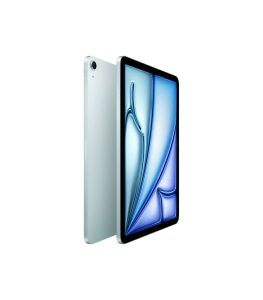 The Apple iPad Air M4 (2026) is designed to deliver an immersive multimedia experience, combining its large 13-inch Liquid Retina display with high-quality stereo audio output. Whether streaming movies, attending online classes, or playing games, the device offers a balanced and engaging experience. The speakers are tuned to deliver clear vocals and rich sound separation, enhancing both entertainment and communication. Everyday usage scenarios such as web browsing, email management, and document editing feel smooth and responsive due to the strong hardware-software integration. The device is equally suitable for casual users and professionals who require a reliable daily driver. Its portability ensures that it can be used comfortably at home, in offices, or while traveling. Overall, it blends entertainment, productivity, and mobility into a single cohesive experience that defines modern tablet computing.