
Dell WD22TB4 Thunderbolt Dock
Dell WD22TB4 Thunderbolt Dock
Description
Features
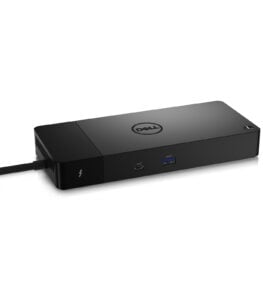
The Dell WD22TB4 Thunderbolt Dock is a cutting-edge docking station engineered to enhance productivity, streamline connectivity, and simplify cable management for professionals, creatives, and enterprise users alike. It features a modular design that distinguishes it from many of its competitors. The modularity allows users to replace the connectivity module independently of the base, offering an unparalleled level of upgradeability and future-proofing. Its sleek matte black chassis with rounded edges fits seamlessly into any modern desk setup, whether in a corporate office or a home workstation. It also includes the signature Dell logo, a sturdy build, and a compact footprint that allows users to declutter their workspace while maintaining high-speed data transfer and high-resolution video output capabilities.
Connectivity and Ports
The WD22TB4 dock offers a rich variety of ports, which cater to the extensive needs of power users who demand robust connectivity. It is equipped with Thunderbolt 4 technology that provides ultra-fast data transfer speeds and enables daisy-chaining of multiple devices through a single connection. The dock includes dual DisplayPort outputs, an HDMI port, multiple USB-A and USB-C ports, an Ethernet port, a headphone/microphone combo jack, and a power input. This variety allows for simultaneous connection of multiple peripherals, including monitors, keyboards, external storage drives, audio interfaces, and network devices. With support for up to four displays via MST (Multi-Stream Transport) and daisy-chaining, it is ideal for multi-monitor setups common in data analysis, content creation, and software development environments.
Performance and Power Delivery
One of the key highlights of the Dell WD22TB4 is its impressive power delivery capabilities. It delivers robust power through its Thunderbolt 4 port, allowing it to charge laptops, tablets, and smartphones efficiently. The dock can deliver up to ninety watts of power to compatible Dell laptops and up to seventy-five watts for non-Dell Thunderbolt laptops, ensuring that even high-performance devices remain charged throughout extended work sessions. This is particularly beneficial for users of high-end workstations who rely on consistent power for demanding applications such as 3D rendering, video editing, and software compiling. Its ability to power and charge a laptop while connected to multiple peripherals and displays makes it an essential hub for modern computing.
Compatibility and Plug-and-Play Simplicity
The WD22TB4 is designed to be compatible with a wide range of devices across operating systems, including Windows and macOS platforms. While it performs optimally with Dell laptops, particularly the Latitude, Precision, and XPS series, it is also compatible with non-Dell systems that support Thunderbolt 4 or USB-C with DisplayPort Alt Mode. The plug-and-play nature of the dock means that most users can simply connect it to their system and immediately benefit from expanded connectivity without needing to install drivers manually. This makes deployment in enterprise environments straightforward and hassle-free. Additionally, Dell Command Update and Dell Client Command Suite provide centralized management tools for IT departments to streamline firmware updates and device configuration across large fleets of deployed docks.
Display Support and Visual Fidelity
The dock is ideal for professionals who require high-resolution displays for detailed visual work. It supports dual 4K monitors at sixty hertz or a single 8K display, depending on the configuration and connected hardware. The DisplayPort 1.4 and HDMI 2.0 ports allow seamless output of high-resolution video with accurate color reproduction, making it suitable for graphic designers, video editors, and engineers who depend on precision in their visual workflows. Whether used in extended desktop mode or mirror display setup, the WD22TB4 delivers crystal-clear output with low latency and high refresh rates. This allows for smoother multitasking and a more immersive visual experience, particularly when working with animation, CAD software, or real-time video preview.
Modularity and Upgradeability
Unlike many other docking stations in the market, the WD22TB4 features a modular architecture that sets a new standard in the industry. The Thunderbolt 4 module can be detached and replaced independently of the base unit, providing flexibility for future upgrades as technology evolves. This feature is particularly useful for businesses that plan for long-term deployments, as it reduces electronic waste and lowers total cost of ownership. Users can replace the Thunderbolt module with a future module (such as a USB-C or updated Thunderbolt version) when needed, making it a forward-compatible choice for organizations looking to extend the lifecycle of their equipment.
Enterprise and Security Features
Built with enterprise deployment in mind, the dock includes several features aimed at large-scale business environments. It supports PXE boot, Wake-on-LAN, and MAC address pass-through, which are critical for network management and remote diagnostics. These features allow IT departments to manage devices effectively, even when the primary system is not powered on. Additionally, the lock slot allows physical security measures to be implemented easily, deterring theft in shared or public environments. Dell’s commitment to secure and manageable technology is clearly reflected in the design and firmware capabilities of the WD22TB4, making it an ideal choice for business and government users with stringent security requirements.
User Experience and Real-World Utility
In real-world usage, the WD22TB4 Thunderbolt Dock significantly enhances productivity by reducing the need for repetitive plug-in and plug-out tasks. Professionals who regularly switch between office and remote work benefit from the dock’s ability to provide instant access to a full workstation setup through a single cable. Whether you’re joining virtual meetings, managing large datasets, editing high-resolution media, or developing code, the dock streamlines access to essential tools and resources without interruptions. The durable build quality ensures longevity even with daily use, while the fanless design contributes to silent operation, which is appreciated in quiet office environments. Many users have reported seamless operation across a variety of devices and operating systems, which demonstrates its reliability and broad compatibility in diverse work scenarios.
Environmental Considerations
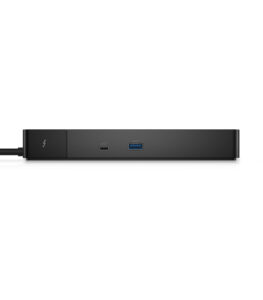 Dell continues to emphasize sustainability in its products, and the WD22TB4 is no exception. The dock is built using environmentally responsible materials and is compliant with global energy efficiency and sustainability standards such as ENERGY STAR and EPEAT. The ability to upgrade the module instead of replacing the entire dock reduces electronic waste, making it a more eco-friendly option. This aligns with the increasing focus of businesses and consumers on green IT practices and environmentally conscious technology investments.
The Dell WD22TB4 Thunderbolt Dock is a powerful, versatile, and future-ready docking solution that meets the connectivity needs of today’s professionals while preparing for tomorrow’s challenges. Its modular architecture, extensive port selection, advanced display support, and high-speed data transfer capabilities make it one of the most comprehensive docking stations available. With strong compatibility across Dell and non-Dell systems, robust power delivery, and enterprise-grade security features, it serves as an ideal hub for both individual users and large organizations. Whether deployed in a creative studio, engineering lab, financial trading floor, or corporate office, the WD22TB4 offers exceptional performance, reliability, and convenience in a compact and thoughtfully designed package.