
HP OfficeJet Pro 9023 All-in-One Printer
HP OfficeJet Pro 9023 All-in-One Printer
Description
Features
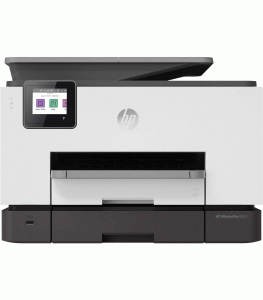
In today’s dynamic work environment, having a reliable and efficient printer is crucial for maintaining productivity. The HP OfficeJet Pro 9023 All-in-One Printer aims to meet these demands with its comprehensive set of features designed to streamline printing, scanning, copying, and faxing tasks. This review explores the design, performance, features, and overall value of the HP OfficeJet Pro 9023, highlighting its suitability for small offices and home office setups.
Design and Build Quality
The HP OfficeJet Pro 9023 features a modern and compact design that blends seamlessly into any office decor. With dimensions of 17.2 x 15.6 x 12.53 inches and weighing approximately 26 pounds, it strikes a balance between functionality and space-saving design. The build quality is robust, utilizing durable materials that ensure longevity and reliability even under heavy use. The printer is equipped with a user-friendly 2.65-inch color touchscreen display that simplifies navigation through various functions and settings. The intuitive interface makes it easy for users to access print, scan, copy, and fax options directly from the device without the need for extensive training or technical expertise.
Print Performance
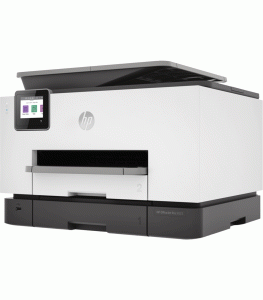
Print performance is a standout feature of the HP OfficeJet Pro 9023, catering to the needs of busy office environments. It offers impressive print speeds of up to 24 pages per minute (ppm) for black-and-white documents and up to 20 ppm for color documents. This rapid output ensures that users can quickly produce high-quality prints, enhancing workflow efficiency. The printer supports automatic two-sided printing (duplexing), allowing users to save on paper costs and reduce environmental impact without compromising productivity. With a print resolution of up to 1200 x 1200 dpi for black-and-white prints and up to 4800 x 1200 optimized dpi for color prints, the OfficeJet Pro 9023 delivers sharp text and vibrant graphics suitable for professional documents and marketing materials.
Scanning and Copying
In addition to its printing capabilities, the HP OfficeJet Pro 9023 excels in scanning and copying tasks. The flatbed scanner offers an optical resolution of up to 1200 dpi, ensuring detailed and accurate scans of documents and photos. The integrated automatic document feeder (ADF) supports up to 35 sheets, facilitating efficient scanning and copying of multi-page documents without manual intervention. The copier function of the OfficeJet Pro 9023 provides versatile options, including resizing documents, adjusting brightness and contrast, and producing up to 99 copies at a time. Copy speeds are impressive, with up to 21 copies per minute for black-and-white and up to 15 copies per minute for color, making it suitable for a variety of office copying needs.
Fax Capabilities
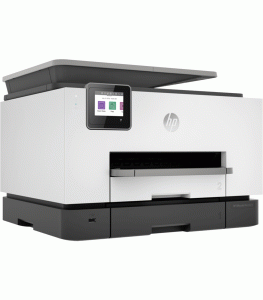
For offices that still rely on fax communication, the HP OfficeJet Pro 9023 offers robust fax capabilities. It supports a fax resolution of up to 300 x 300 dpi, ensuring clear and legible transmission of documents. The printer can store up to 100 pages in its memory, allowing users to send and receive faxes efficiently without the need for a dedicated fax machine.
Paper Handling and Capacity
The HP OfficeJet Pro 9023 is designed to handle a wide range of media types and sizes, making it versatile for different office needs. It includes a 250-sheet input tray and a 75-sheet output tray, minimizing the need for frequent paper refills during high-volume printing tasks. The printer supports media sizes ranging from 3 x 5 inches to 8.5 x 14 inches (letter, legal, and photo sizes), as well as envelopes and cards.
Cost Efficiency
Cost efficiency is a significant consideration for any office, and the HP OfficeJet Pro 9023 delivers in this aspect. The printer features HP’s Instant Ink subscription service, which helps users save up to 50% on ink costs compared to purchasing cartridges individually. The subscription plans are based on monthly page volume, ensuring that users only pay for the pages they print. This cost-effective approach makes the OfficeJet Pro 9023 an economical choice for offices with varying printing needs. Furthermore, the printer’s ENERGY STAR® certification signifies its energy-efficient design, reducing power consumption and operational costs over time. The use of high-yield ink cartridges and automatic duplex printing further contributes to cost savings by minimizing paper and ink wastage.
Environmental Considerations
HP is committed to sustainability, and the OfficeJet Pro 9023 reflects this commitment through its eco-friendly features. The printer is ENERGY STAR® certified, meeting strict energy efficiency guidelines set by the U.S. Environmental Protection Agency (EPA). HP’s Planet Partners program allows users to recycle genuine HP cartridges responsibly, reducing environmental impact and promoting a circular economy.
Ease of Use and Security
The HP OfficeJet Pro 9023 is designed for ease of use, featuring a straightforward setup process and intuitive controls. The touchscreen display provides easy access to printer functions, settings, and troubleshooting guides, minimizing downtime and enhancing user productivity. The printer’s built-in security features, including secure boot, secure firmware updates, and password protection, help safeguard sensitive data and ensure compliance with data protection regulations.
Connectivity Options
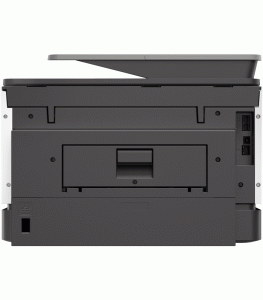
Connectivity is another area where the HP OfficeJet Pro 9023 excels, offering multiple options to suit diverse user preferences. The printer supports wireless connectivity, allowing users to print directly from their smartphones, tablets, and laptops without the need for cables. It also includes Ethernet and USB ports for wired connections, providing flexibility in network setup. The printer is compatible with HP ePrint, Apple AirPrint, Mopria-certified, and Wi-Fi Direct for seamless printing from various mobile devices. Additionally, the HP Smart app enhances usability by enabling remote printing, scanning, and printer management directly from a mobile device. Users can monitor ink levels, order supplies, and troubleshoot issues conveniently from the app, ensuring uninterrupted workflow.
You may want to assess this product further: HP Printer