
HP USB-C G5 Essential Dock
HP USB-C G5 Essential Dock
Description
Features
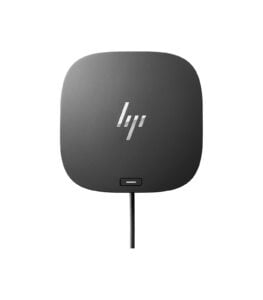 The modern workspace is fast-paced and interconnected, requiring efficient connectivity solutions that provide seamless access to multiple devices. For professionals working with various peripherals, monitors, and network connections, a reliable docking station can simplify workflow, enhance productivity, and reduce clutter. The HP USB-C G5 Essential Dock offers a powerful solution designed for versatility and ease of use, making it an ideal choice for both personal and professional workstations. This compact dock supports multi-monitor setups, provides ample power, and seamlessly connects with a broad range of devices.
HP USB-C G5 Essential Dock
The HP USB-C G5 Essential Dock is a versatile docking solution designed for flexibility and convenience. Built with both USB-C and Thunderbolt™ compatibility, the dock allows users to connect laptops, monitors, peripherals, and networking equipment easily through a single USB-C connection. The dock supports high-resolution multi-monitor setups, fast data transfers, and a streamlined power solution, making it an excellent choice for a dynamic work environment. Compatible with a wide range of laptops, the G5 Essential Dock is ideal for businesses with diverse device types. Its compact, sleek design means it’s easy to integrate into any workspace, and its performance capabilities allow it to handle the demands of a professional setup.
Design and Build Quality: Compact and Functional
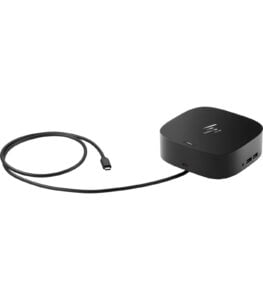 The HP USB-C G5 Essential Dock boasts a clean, minimalist design that easily complements any workstation. It is encased in a sturdy, matte black finish that resists fingerprints and smudges, keeping the dock looking professional and polished. The dock’s compact size allows it to sit comfortably on a desk without taking up much space, helping users maintain an organized workspace.
The layout of the dock is designed for easy access, with ports on both the front and back. Front-facing ports offer quick connectivity for devices you may need to plug in or remove frequently, like flash drives or headphones, while the back hosts more permanent connections like monitors and Ethernet.
Power Delivery: Keep Your Devices Charged
The HP USB-C G5 Essential Dock includes a 65W power delivery feature, ensuring that connected laptops and devices stay charged while in use. This single-cable power delivery feature reduces the need for multiple chargers, helping maintain a clutter-free workspace.
For those who frequently use their laptops on the go, the G5 Essential Dock’s power delivery function offers the convenience of fast charging, meaning your laptop can charge quickly while docked. The power supply is sufficient to handle both light and moderate workloads, making it ideal for office use, remote work, and hybrid setups.
Multi-Monitor Support: Enhanced Productivity
One of the standout features of the HP USB-C G5 Essential Dock is its support for up to three high-resolution external monitors. With two DisplayPorts and one HDMI port, the dock provides ample flexibility to set up dual or triple monitor configurations. This feature is ideal for professionals in design, data analysis, project management, or any role that requires multiple windows or applications open simultaneously.
The dock supports up to 4K resolution on connected monitors, allowing for clear, crisp visuals, which is particularly beneficial for creative professionals and video editors. Having multiple screens can boost productivity by enabling better multitasking, allowing users to dedicate specific monitors to different tasks and streamline their workflow.
Setup and Ease of Use
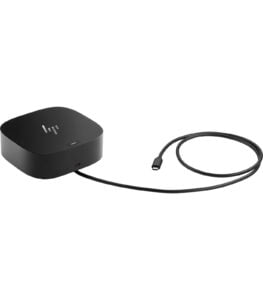 Setting up the HP USB-C G5 Essential Dock is simple and straightforward. The dock connects to your laptop through a single USB-C cable, which is included in the package, and automatically installs drivers for most Windows and macOS systems without requiring additional software. This plug-and-play setup makes it easy to get started and reduces the hassle of a complicated installation.
The user-friendly design also makes it easy to connect and disconnect devices as needed. Thanks to the quick-access ports on the front, you can easily connect temporary devices without having to reach around the dock, which is helpful for users who frequently swap devices like flash drives, cameras, or headphones.
Compatibility: Works with Various Devices
The HP USB-C G5 Essential Dock is designed with broad compatibility, supporting most USB-C and Thunderbolt™ enabled laptops, including non-HP brands. This makes it an ideal solution for environments with a mix of different laptop brands and models, as the dock’s universal compatibility ensures that it can handle various devices.
HP has optimized this dock for specific HP models, but it performs reliably across a wide array of third-party devices as well. This flexibility makes it an excellent choice for businesses with mixed fleets or for users who need a docking solution compatible with different devices.
Security Features: Ideal for Enterprise Use
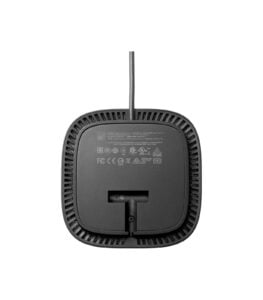 For businesses and shared workspaces, the HP USB-C G5 Essential Dock provides security features to protect devices and data. The dock includes a lock slot, allowing users to physically secure the dock to their workstation with a compatible lock. This feature can deter theft and tampering, making it a safe option for use in office environments where devices may be left unattended.
The dock is also manageable by IT teams, making it a business-friendly solution. Remote management tools allow IT administrators to update and maintain the dock’s software and settings, providing a convenient and secure solution for enterprise environments.
Environmental Considerations
HP has integrated environmentally friendly practices into the design of the USB-C G5 Essential Dock. It is ENERGY STAR® certified, indicating compliance with energy efficiency standards, which reduces power consumption and the environmental impact of the dock. The dock is also EPEAT® registered, which reflects HP’s commitment to sustainability and the use of responsible materials in its products.
These eco-friendly certifications make the G5 Essential Dock an ideal choice for users and companies conscious of their environmental footprint, adding another layer of value for those looking to invest in sustainable technology.
Comprehensive Connectivity Options
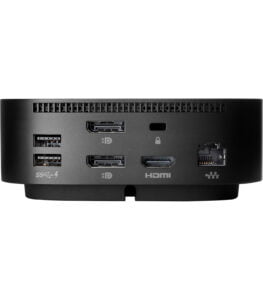 The HP USB-C G5 Essential Dock is equipped with a wide array of ports, providing everything you need to connect your devices in one compact hub. Here’s a detailed look at its connectivity options:
- USB-C Port: The dock features a USB-C port for connecting to your laptop, which enables both data transfer and power delivery.
- USB-A Ports: With four USB-A 3.0 ports, the dock supports multiple peripherals like keyboards, mice, and external drives, making it easy to set up a complete workstation.
- DisplayPort and HDMI Ports: The dock includes two DisplayPorts and one HDMI port, supporting multiple high-resolution monitors. This is particularly useful for users who require additional screen space for multitasking, content creation, or data analysis.
- Ethernet Port: For stable, high-speed internet connectivity, the dock provides an RJ-45 Gigabit Ethernet port, ensuring uninterrupted and reliable internet access, even in situations where Wi-Fi may be unstable.
- Audio Combo Jack: A 3.5mm audio combo jack allows for connection of headphones, headsets, or external speakers, ensuring high-quality audio support for calls, media playback, or video conferencing.
The comprehensive array of ports on the HP USB-C G5 Essential Dock covers almost every connectivity need, allowing users to connect devices seamlessly without constantly switching cables.
you can also view this product: HP Dock