
HP USB-C Universal Dock G5
HP USB-C Universal Dock G5
Description
Features
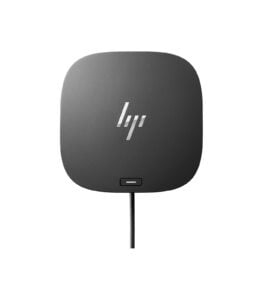
The HP USB-C Universal Dock G5 is a versatile and highly functional docking station designed to streamline connectivity and enhance productivity for users with USB-C-enabled laptops and devices. As work environments increasingly shift towards remote and hybrid setups, the need for reliable docking solutions that can handle multiple devices and peripherals has never been greater. The HP USB-C Universal Dock G5 meets this demand with its robust features, ease of use, and compatibility with a wide range of devices. we’ll explore the key features, design, performance, and why the HP USB-C Universal Dock G5 is an essential tool for modern professionals.
Design and Build Quality
The HP USB-C Universal Dock G5 boasts a sleek and compact design that fits seamlessly into any workspace, whether it’s a home office, corporate environment, or a mobile setup. The dock’s minimalist black finish and small footprint make it unobtrusive, allowing it to blend in with other office equipment or sit discreetly on your desk. The build quality of the dock is impressive, with a solid construction that feels durable and reliable. The dock is designed to withstand the rigors of daily use, whether you’re constantly plugging and unplugging devices or transporting it between different locations. The rubberized base ensures that the dock stays securely in place on your desk, preventing it from sliding around or being easily knocked over. One of the standout design features of the HP USB-C Universal Dock G5 is its port layout, which is both practical and easy to access.
Power Delivery and Charging
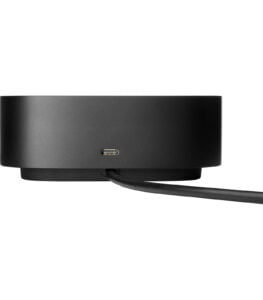
One of the key benefits of the HP USB-C Universal Dock G5 is its ability to deliver up to 100W of power to connected devices. This power delivery feature allows the dock to charge your laptop or tablet while it’s connected, eliminating the need for separate chargers and reducing cable clutter on your desk. This is particularly advantageous for users who need to keep their devices charged throughout the day, whether they’re working from home, in an office, or on the go. The dock’s power delivery capability ensures that even power-hungry laptops, such as those used for intensive tasks like video editing or 3D rendering, can remain fully charged while connected. This feature not only enhances productivity but also simplifies the setup process, as you can connect your laptop to the dock with a single USB-C cable that handles both power and data transfer.
Performance and User Experience
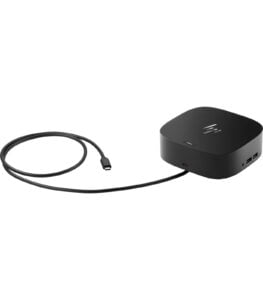
In terms of performance, the HP USB-C Universal Dock G5 delivers consistently across the board. The dock provides a seamless experience when connecting and disconnecting devices, with fast and stable data transfer speeds that ensure your peripherals function smoothly. Whether you’re transferring large files between external drives, streaming 4K video to multiple monitors, or accessing network resources via Ethernet, the dock handles these tasks with ease. The dock’s plug-and-play functionality is another highlight, allowing users to quickly set up their workspace without the need for complex installation processes or additional drivers. This ease of use is particularly beneficial for professionals who may need to switch between different work environments or share the dock with colleagues.
Security and Management
For businesses and professionals who prioritize security, the HP USB-C Universal Dock G5 includes an integrated security lock slot (lock sold separately). This feature allows you to physically secure the dock to your desk or workstation, providing an added layer of protection against theft or unauthorized removal. This is particularly useful in shared workspaces or environments where sensitive equipment needs to be safeguarded. In addition to physical security, the dock is also compatible with HP’s Device Manager software, which offers advanced management and monitoring capabilities. This software allows IT administrators to remotely manage connected devices, monitor dock performance, and apply firmware updates, making it a valuable tool for businesses that need to maintain a fleet of docking stations across multiple locations.
Connectivity and Ports
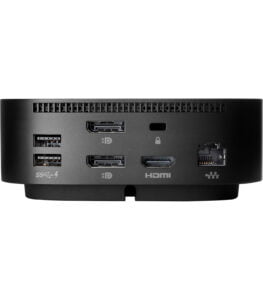
The HP USB-C Universal Dock G5 excels in connectivity, offering a wide range of ports that cater to various devices and peripherals. The dock’s USB-C connection allows it to be compatible with a broad array of laptops and tablets, not just HP devices. This universal compatibility makes it a valuable addition to any multi-device setup, whether you’re using it with a Windows laptop, a MacBook, or other USB-C and Thunderbolt-enabled devices. The dock supports up to dual 4K displays via its HDMI and DisplayPort outputs, providing ample screen real estate for multitasking, creative work, and immersive entertainment. The ability to connect multiple high-resolution monitors is a significant advantage for professionals who need to manage multiple applications simultaneously, such as graphic designers, video editors, and financial analysts. In addition to display connectivity, the HP USB-C Universal Dock G5 offers a robust selection of USB ports, including three USB 3.0 ports and two USB 2.0 ports. These ports provide fast data transfer speeds and can accommodate a wide range of peripherals, from external hard drives and printers to keyboards and mice. The inclusion of USB 2.0 ports is particularly useful for connecting legacy devices that may not require the higher speeds of USB 3.0.