
Lenovo ThinkPad Hybrid USB Type-C Laptop Dock with USB Type-A Adapter – 40AF0135CN
Lenovo ThinkPad Hybrid USB Type-C Laptop Dock with USB Type-A Adapter – 40AF0135CN
Description
Features
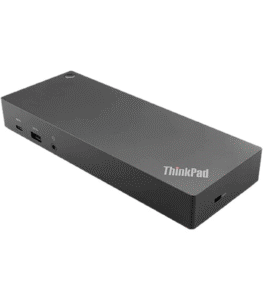
The Lenovo ThinkPad Hybrid USB Type-C Laptop Dock with USB Type-A Adapter (40AF0135CN) is a versatile and efficient docking solution designed to cater to the connectivity needs of modern professionals. As the work environment evolves, with more people working from home or in hybrid setups, having a reliable docking station that can manage multiple devices and peripherals is crucial. This dock is specifically engineered to enhance productivity by offering seamless connections to various devices, whether you’re using a USB-C or a USB-A interface. we’ll explore the key features, design, performance, and overall value of the Lenovo ThinkPad Hybrid USB Type-C Laptop Dock.
Design and Build Quality
The Lenovo ThinkPad Hybrid USB Type-C Laptop Dock boasts a sleek and professional design that is well-suited for any modern workspace. Its compact form factor ensures that it doesn’t take up much space on your desk, making it easy to maintain an organized and clutter-free environment. The dock’s matte black finish, coupled with subtle Lenovo branding, gives it a clean and sophisticated look, making it a stylish addition to any professional setup. The build quality of the dock is solid, with a robust construction that feels durable and capable of withstanding the rigors of daily use. The dock is designed for portability, allowing users to easily transport it between different work locations without worrying about wear and tear. The included USB Type-A adapter adds to its versatility, enabling compatibility with older laptops and devices that may not have a USB-C port.
Power Delivery and Charging
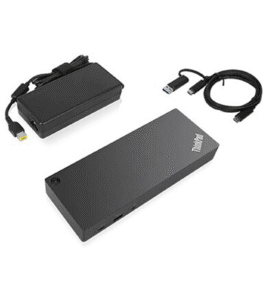
One of the key benefits of the Lenovo ThinkPad Hybrid USB Type-C Laptop Dock is its power delivery capabilities. The dock provides up to 135W of power, making it capable of charging even high-performance laptops while they are connected. This eliminates the need for separate chargers and reduces cable clutter on your desk, making it easier to maintain a clean and organized workspace. The dock’s power delivery feature ensures that your devices remain charged throughout the day, even when performing power-intensive tasks such as video editing, 3D rendering, or running multiple virtual machines. This is particularly advantageous for professionals who need to keep their devices charged and ready to go at all times, whether they’re working from home, in an office, or on the go.
Performance and User Experience
In terms of performance, the Lenovo ThinkPad Hybrid USB Type-C Laptop Dock delivers consistently across the board. The dock provides a seamless experience when connecting and disconnecting devices, with fast and stable data transfer speeds that ensure your peripherals function smoothly. Whether you’re transferring large files between external drives, streaming 4K video to multiple monitors, or accessing network resources via Ethernet, the dock handles these tasks with ease. The dock’s plug-and-play functionality is another highlight, allowing users to quickly set up their workspace without the need for complex installation processes or additional drivers. This ease of use is particularly beneficial for professionals who may need to switch between different work environments or share the dock with colleagues.
Security and Management
For businesses and professionals who prioritize security, the Lenovo ThinkPad Hybrid USB Type-C Laptop Dock includes an integrated security lock slot, providing an added layer of protection against theft or unauthorized removal. This feature is particularly useful in shared workspaces or environments where sensitive equipment needs to be safeguarded. The dock is also compatible with Lenovo’s Device Manager software, which offers advanced management and monitoring capabilities. This software allows IT administrators to remotely manage connected devices, monitor dock performance, and apply firmware updates, making it a valuable tool for businesses that need to maintain a fleet of docking stations across multiple locations.
Connectivity and Ports
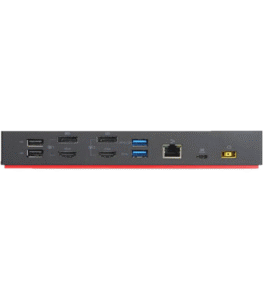
The Lenovo ThinkPad Hybrid USB Type-C Laptop Dock excels in connectivity, offering a comprehensive range of ports that accommodate a wide variety of devices and peripherals. The dock’s hybrid design ensures compatibility with both USB-C and USB-A laptops, making it a versatile solution for users who work with multiple device types or need to connect legacy equipment. The dock supports dual 4K displays or triple 1080p displays via its HDMI and DisplayPort outputs, providing ample screen real estate for multitasking, creative work, and immersive viewing experiences. The ability to connect multiple high-resolution monitors is a significant advantage for professionals who need to manage multiple applications simultaneously, such as graphic designers, video editors, and financial analysts. In addition to display connectivity, the Lenovo ThinkPad Hybrid USB Type-C Dock offers a robust selection of USB ports, including two USB 3.1 Gen 2 ports and two USB 2.0 ports. These ports provide fast data transfer speeds and can accommodate a wide range of peripherals, from external hard drives and printers to keyboards and mice. The inclusion of USB 2.0 ports is particularly useful for connecting legacy devices that may not require the higher speeds of USB 3.1.