
Lenovo ThinkStation P360 TWR (750W) 30FMS09K00 12th Gen Core i9-12900 16GB RAM 512GB SSD Win 10 Pro
Lenovo ThinkStation P360 TWR (750W) 30FMS09K00 12th Gen Core i9-12900 16GB RAM 512GB SSD Win 10 Pro
Description
Buy Lenovo ThinkStation P360 TWR (750W) 30FMS09K00 12th Gen Core i9-12900 16GB RAM 512GB SSD Win 10 Pro with best prices to get Fast Delivery to Dubai, Sharjah, Abu Dhabi, Ajman, Al Ain, and Ras Al Khaimah.
Features
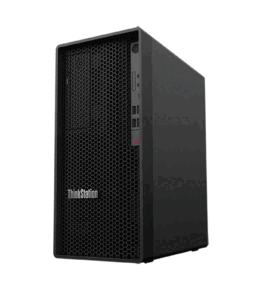 The Lenovo ThinkStation P360 Tower Workstation (TWR) is a robust, scalable system designed for professionals who require a balance between powerful performance, affordability, and versatility. Equipped with the latest 12th Gen Intel Core i9-12900 processor, this workstation is built for industries such as architecture, design, video editing, and engineering, where multitasking and computationally intensive tasks are the norm. This model offers 16GB of DDR5 RAM, a 512GB SSD, and runs Windows 10 Pro, making it an excellent solution for professionals seeking a reliable and customizable system.
12th Gen Intel Core i9-12900 Processor
At the core of the Lenovo ThinkStation P360 TWR is Intel’s 12th Gen Core i9-12900, one of the most advanced processors in the market today. This CPU features a hybrid architecture, combining 8 Performance cores (P-cores) and 8 Efficiency cores (E-cores), for a total of 16 cores and 24 threads. The P-cores handle high-performance tasks like 3D rendering and video encoding, while the E-cores manage background processes and less-demanding applications, ensuring optimal performance in multitasking scenarios.
The Core i9-12900 has a base clock speed of 2.4 GHz, which can boost up to 5.1 GHz using Intel Turbo Boost Max Technology 3.0, allowing it to handle demanding tasks with ease. The combination of core types makes the i9-12900 ideal for both single-threaded and multi-threaded workloads, offering flexibility across a wide range of professional applications.
Memory and Storage
This model of the Lenovo ThinkStation P360 is equipped with 16GB of DDR5 RAM, which offers faster speeds and more efficient power consumption than its predecessor, DDR4. The upgrade to DDR5 ensures that professionals can handle multiple applications simultaneously without experiencing system slowdowns. This is particularly important for tasks like video editing, graphic design, and CAD modeling, where high memory bandwidth is crucial.
For users with more demanding memory requirements, the P360 TWR supports up to 128GB of RAM across four DIMM slots. This allows for future upgrades, making it a scalable solution for professionals who may need additional memory for increasingly complex projects.
In terms of storage, the system includes a 512GB PCIe NVMe SSD. This solid-state drive provides fast boot times, quick access to files, and speedy load times for applications. The NVMe interface offers significant improvements over traditional SATA-based SSDs, particularly in terms of read and write speeds, making it ideal for data-heavy workflows. For users needing additional storage, the ThinkStation P360 can support multiple storage drives, including both SSDs and HDDs, with optional RAID configurations for improved performance or redundancy.
Windows 10 Pro Operating System
The Lenovo ThinkStation P360 TWR comes pre-installed with Windows 10 Pro, an operating system designed for business and professional environments. Windows 10 Pro offers a suite of features aimed at improving productivity, security, and system management. These include BitLocker encryption for securing sensitive data, Remote Desktop for accessing the system from anywhere, and Windows Update for Business, which allows organizations to manage updates more efficiently.
In addition, Windows 10 Pro includes features like Hyper-V for creating virtual machines and Enterprise-grade security protocols, such as Windows Defender Antivirus and Advanced Threat Protection. These ensure that your workstation is protected against malware and cyberattacks, making it an excellent choice for professionals working with sensitive data.
Expandability and Customization
One of the key strengths of the Lenovo ThinkStation P360 TWR is its expandability. The tower design allows for easy access to internal components, making upgrades simple and efficient. The system can be customized to meet the unique needs of various industries, supporting a range of NVIDIA and AMD graphics cards, additional storage options, and upgraded memory configurations.
The P360 is compatible with NVIDIA Quadro and NVIDIA RTX graphics cards, which are tailored for professional workloads such as 3D rendering, video editing, and data visualization. These GPUs offer exceptional parallel computing power and advanced features such as ray tracing and AI-enhanced workflows, making the ThinkStation P360 suitable for complex graphical tasks.
In addition to its graphical capabilities, the P360 TWR features several PCIe expansion slots, allowing for the installation of additional components, such as network cards, storage controllers, and sound cards. This flexibility ensures that users can customize the workstation to meet their specific requirements, whether it’s for expanding storage capacity or improving network performance.
Cooling and Power Efficiency
To ensure that the Lenovo ThinkStation P360 operates efficiently under heavy workloads, it has been designed with advanced cooling solutions. The tower features an optimized airflow system that ensures components remain cool, even during intensive tasks like rendering or video encoding. This is particularly important for systems that run demanding software for extended periods, as overheating can lead to throttling and reduced performance.
Additionally, the system’s 750W power supply provides sufficient power for high-end components, such as the Intel Core i9-12900 CPU and NVIDIA RTX GPUs. This ensures that the workstation can handle power-hungry tasks without instability or power issues. The power supply is also 80 PLUS Platinum-certified, meaning it is highly efficient, reducing energy consumption and operating costs over time.
Security Features
Lenovo places a strong emphasis on security with the ThinkStation P360 TWR, integrating several key features to protect sensitive data and prevent unauthorized access. The system comes with Trusted Platform Module (TPM) 2.0, which ensures hardware-based security, protecting encryption keys and sensitive information from being compromised.
Additionally, Lenovo’s ThinkShield suite provides end-to-end protection for both the hardware and software aspects of the workstation. Smart USB Protection ensures that no unauthorized USB devices can access the system, reducing the risk of malware or data theft. These security features are essential for businesses and professionals working with sensitive or confidential information.
Graphics and GPU Options
Although the Lenovo ThinkStation P360 TWR can be configured with a range of NVIDIA Quadro and RTX graphics cards, the base model may not come with a dedicated GPU. This flexibility allows users to select a GPU that best meets their specific needs. For instance, users working in video production, 3D rendering, or machine learning may choose an NVIDIA RTX A2000 or A4000, both of which offer advanced features like ray tracing, AI-accelerated workflows, and high-performance computing.
For those in industries like architecture or engineering, where graphical performance is critical, these high-end GPUs provide the parallel processing power needed to render complex models, simulate physical phenomena, or visualize large datasets. The ability to support multiple GPUs also makes the P360 a strong candidate for professionals working with virtual reality (VR) applications or intensive scientific computations.
Use Cases
The Lenovo ThinkStation P360 TWR is designed to meet the needs of a variety of professional use cases, including:
- CAD and 3D Modeling: The workstation’s powerful processor and GPU options make it ideal for engineers, architects, and designers working with CAD software like AutoCAD or SolidWorks.
- Video Editing and Post-Production: With support for NVIDIA RTX GPUs and fast DDR5 memory, the P360 can handle large video files, apply complex effects, and render high-resolution footage efficiently.
- Data Analysis and Simulation: Professionals in scientific research, finance, or engineering can leverage the P360’s multi-core performance and GPU capabilities to run simulations, process large datasets, and perform complex calculations.
- Software Development: The hybrid architecture of the 12th Gen Intel Core i9-12900 allows software developers to run multiple virtual machines, compile large codebases, and manage complex development environments smoothly.
The Lenovo ThinkStation P360 TWR is a versatile and powerful workstation that caters to the needs of professionals across various industries. With its 12th Gen Intel Core i9-12900 processor, expandability, and customization options, it is an ideal choice for those who require high-performance computing for demanding workloads. Whether you’re working in 3D rendering, video editing, or data analysis, the ThinkStation P360 provides the performance, reliability, and security needed to excel in today’s competitive professional environments.
Connectivity and Ports
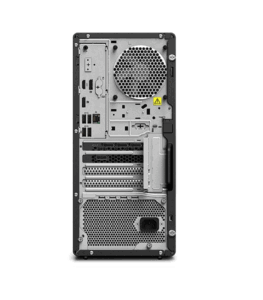 The Lenovo ThinkStation P360 TWR offers a wide variety of ports and connectivity options to meet the needs of modern professionals. These include multiple USB 3.2 Gen 1 and USB 3.2 Gen 2 ports for high-speed data transfer, as well as USB 2.0 ports for legacy devices. The workstation also includes USB Type-C ports, which are becoming increasingly popular for their reversible design and high data transfer speeds.
For network connectivity, the ThinkStation P360 comes equipped with Gigabit Ethernet, ensuring fast and stable internet access for downloading large files, working in the cloud, or collaborating on projects remotely. The system also supports Wi-Fi and Bluetooth, providing additional wireless connectivity options for peripherals and external devices.
In terms of display output, the P360 TWR supports multiple monitors, with the ability to connect through DisplayPort, HDMI, or DVI depending on the installed graphics card. This is ideal for professionals who require a multi-monitor setup for tasks like video editing, CAD modeling, or data analysis.