
Logitech M220 Silent Wireless Mouse – Charcoal
Logitech M220 Silent Wireless Mouse – Charcoal
Description
Features
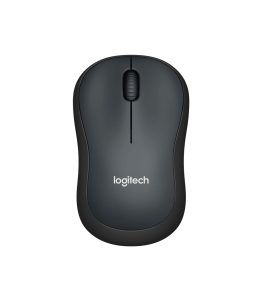 The Logitech M220 Silent Wireless Mouse – Charcoal by Logitech is thoughtfully designed for users who value simplicity, comfort, and quiet performance. Its charcoal finish gives it a professional and modern appearance, making it suitable for office environments, home workspaces, classrooms, and shared spaces. The compact and symmetrical design ensures that it fits comfortably in either hand, making it ideal for both left- and right-handed users. The smooth matte surface provides a firm grip without attracting excessive fingerprints, maintaining a clean look over time. Its lightweight construction allows easy portability, so it can be carried in a laptop bag without adding bulk. Despite its minimalistic appearance, the mouse feels solid and durable, reflecting Logitech’s reputation for long-lasting peripherals.
SilentTouch Technology
One of the most defining features of the Logitech M220 Silent Wireless Mouse is its SilentTouch technology. This advanced feature reduces click noise by up to 90% compared to standard mice, including models like the Logitech M170. Independent laboratory tests measured left-click sound levels at 1 meter, confirming the significant reduction in noise. This makes the M220 an excellent choice for quiet environments such as libraries, offices, shared workspaces, or late-night home use. You can click, scroll, and work without disturbing others around you. The silent performance does not compromise tactile feedback; users still experience a soft and responsive click, ensuring productivity and comfort. SilentTouch technology enhances focus by eliminating unnecessary distractions caused by repetitive clicking sounds.
Wireless Connectivity & Range
The Logitech M220 operates on a reliable 2.4 GHz wireless connection, delivering smooth and stable performance without lag or interruptions. It connects via a small USB receiver that can be plugged into a laptop or desktop computer, providing instant plug-and-play functionality. No complex setup or additional software is required. The wireless range extends up to 10 meters, although actual performance may vary depending on environmental conditions and system setup. This range allows users to operate their device from a comfortable distance, which is especially useful during presentations or when connecting a computer to a larger display. The strong wireless signal ensures consistent cursor control without dropouts, even in busy environments with multiple wireless devices.
Sensor Technology & Performance
Equipped with smooth optical tracking technology, the Logitech M220 offers a DPI range of 1000±, which is well-balanced for everyday tasks. This sensitivity level ensures precise cursor movement across various surfaces, including desks, mousepads, and even certain textured surfaces. The optical sensor delivers accurate tracking for browsing, document editing, online meetings, and general office work. While it is not specifically designed as a gaming mouse, it performs efficiently for casual use and standard productivity applications. The consistent tracking performance ensures minimal cursor skipping or lag, allowing users to work with confidence and efficiency. The sensor is optimized for energy efficiency, contributing to longer battery life without sacrificing performance.
Button Configuration & Usability
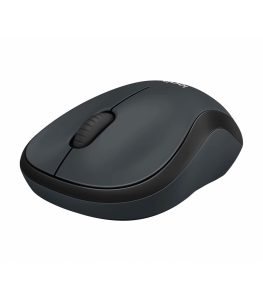 The Logitech M220 Silent Wireless Mouse features a simple yet effective three-button layout. It includes left-click, right-click, and a clickable middle scroll wheel. This straightforward configuration ensures ease of use for beginners and experienced users alike. The SilentTouch feature applies to both left and right clicks, as well as the middle click, providing a quiet yet responsive experience. The tactile feedback remains satisfying, offering users precise control when navigating documents or websites. The buttons are designed for durability, capable of withstanding millions of clicks over time. This makes the M220 a dependable option for daily professional use. The intuitive layout eliminates unnecessary complexity, focusing instead on comfort and reliability.
Scrolling Experience
The Logitech M220 offers line-by-line scrolling with a mechanical 2D scroll wheel. The scroll wheel provides smooth movement with distinct steps, allowing precise navigation through documents, spreadsheets, and web pages. The middle click functionality is particularly useful for opening links in new tabs or enabling auto-scroll features in supported applications. The scroll wheel is designed to operate quietly, aligning with the SilentTouch philosophy. Its textured surface enhances grip, ensuring controlled scrolling without accidental slips. Whether you are reviewing long reports, browsing websites, or navigating software interfaces, the scrolling performance remains consistent and efficient.
Comfort & Ergonomics
Comfort plays a vital role in any computer accessory, and the Logitech M220 delivers a comfortable experience for extended use. The contoured shape supports the natural curve of the hand, reducing strain during prolonged sessions. Its compact size makes it ideal for users who prefer smaller mice or frequently travel with their devices. The lightweight construction prevents wrist fatigue, while the smooth edges enhance overall comfort. The symmetrical design ensures versatility, accommodating both left- and right-handed users without compromise. This ergonomic consideration makes the M220 suitable for students, office workers, and home users alike. Even after hours of usage, the mouse remains comfortable and easy to control.
Power & Efficiency
The Logitech M220 features an on/off switch that helps conserve battery life when the mouse is not in use. This thoughtful addition extends the lifespan of the battery and improves overall efficiency. Logitech’s energy-saving engineering ensures that the mouse consumes minimal power during operation. Combined with automatic sleep mode functionality, the device optimizes battery usage intelligently. Users can expect long-lasting performance without frequent battery replacements. The wireless receiver can be conveniently stored inside the mouse when not in use, preventing loss during travel. This attention to practical details enhances the overall user experience and convenience.
Compatibility & Easy Setup
Setting up the Logitech M220 Silent Wireless Mouse is simple and straightforward. The plug-and-play USB receiver works seamlessly with most operating systems, including Windows, macOS, Linux, and Chrome OS. There is no need for additional drivers or complex installation processes. Once connected, the mouse is ready for immediate use. This compatibility makes it a versatile choice for various devices such as laptops, desktops, and even certain smart TVs that support USB input devices. The universal compatibility ensures that users can switch between different systems without technical difficulties. Its simplicity is one of its strongest advantages, making it accessible to users of all experience levels.
Ideal Usage Scenarios
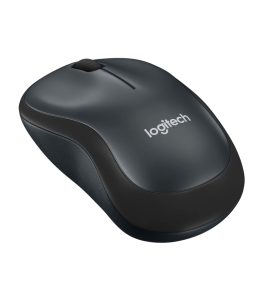 The Logitech M220 Silent Wireless Mouse – Charcoal is an excellent choice for everyday computing needs. It is particularly well-suited for office environments where noise reduction is important. Students can use it in classrooms or libraries without causing distractions. Remote workers benefit from its quiet operation during online meetings and video calls. Its portability makes it perfect for travelers who need a reliable mouse for their laptop. The balanced DPI, stable wireless connection, and silent clicks create a harmonious combination of performance and convenience. With its trusted brand reliability, durable design, and user-friendly features, the Logitech M220 stands out as a practical and efficient wireless mouse for modern computing needs.