
Logitech MK220 Wireless Keyboard and Mouse Combo Black
Logitech MK220 Wireless Keyboard and Mouse Combo Black
Description
Features
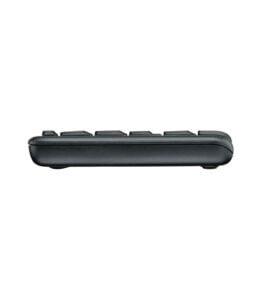
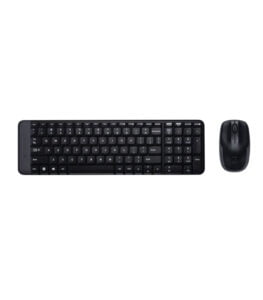 The Logitech MK220 Wireless Keyboard and Mouse Combo Black is designed with a clear focus on compactness, simplicity, and everyday practicality. Unlike full-size keyboard and mouse combinations that demand significant desk space, the MK220 takes a minimalist approach that suits modern work environments where space efficiency matters. The keyboard is intentionally smaller than standard layouts, yet it retains all essential keys, allowing users to work comfortably without feeling cramped. This compact form factor makes it an excellent choice for home offices, shared workstations, small desks, and even casual setups where portability is valued. The black finish adds a professional and neutral aesthetic, blending seamlessly with most desktop environments, whether at home or in an office setting. Logitech’s design philosophy with the MK220 is not about flashy elements or complex features; instead, it emphasizes reliability, ease of use, and comfort for users who want a straightforward wireless solution that simply works day after day.
Wireless Freedom and Reliable Connectivity
One of the strongest aspects of the Logitech MK220 combo is its wireless connectivity, which offers users freedom from cable clutter and the limitations of wired peripherals. The combo operates using Logitech’s 2.4 GHz wireless technology through a tiny USB receiver that connects to a computer and instantly pairs with both the keyboard and the mouse. This single receiver setup keeps USB port usage minimal and ensures a clean workspace. The wireless connection is stable and responsive, allowing users to type and navigate smoothly without noticeable lag or interference in normal working conditions. This makes the MK220 suitable not only for casual home use but also for office tasks that require consistent input performance. The wireless range is sufficient for typical desktop use, letting users sit comfortably without worrying about dropped signals. This level of reliability is particularly important for users who want a no-hassle experience without the complexity of Bluetooth pairing or frequent reconnections.
Keyboard Layout, Key Feel, and Typing Comfort
The keyboard in the Logitech MK220 combo is designed to deliver a comfortable typing experience despite its compact size. The keys are well-spaced and clearly labeled, making it easy to adapt even for users accustomed to larger keyboards. Logitech has optimized the layout to maintain functionality while reducing overall dimensions, which helps users save desk space without sacrificing usability. The key mechanism offers a quiet and responsive feel, making typing smooth and less noisy compared to some traditional keyboards. This quiet operation is particularly useful in shared environments, offices, or homes where excessive typing noise can be distracting. Over extended typing sessions, the keyboard remains comfortable, supporting tasks such as document writing, email communication, data entry, and general browsing. The reduced footprint also encourages better desk ergonomics by allowing users to position the keyboard closer to their natural typing posture.
Mouse Design, Control, and Navigation Experience
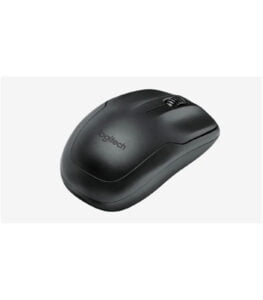
 The mouse included in the Logitech MK220 combo is compact, lightweight, and designed for everyday navigation tasks. Its symmetrical shape allows it to be used comfortably by both left-handed and right-handed users, making it versatile for shared workspaces or households with multiple users. The mouse provides precise cursor control suitable for standard applications such as web browsing, office software, and casual multimedia use. Its buttons are responsive and easy to press, offering a satisfying click without feeling stiff or overly sensitive. The scroll wheel operates smoothly, enabling easy navigation through documents, spreadsheets, and web pages. While the mouse is not designed for high-performance gaming or advanced graphic design, it excels at its intended purpose: delivering consistent, comfortable, and reliable control for daily computing tasks.
Energy Efficiency and Long Battery Life
A major advantage of the Logitech MK220 Wireless Keyboard and Mouse Combo is its energy-efficient design, which significantly reduces the need for frequent battery replacements. Logitech has engineered the keyboard and mouse to consume minimal power while maintaining stable wireless performance. This efficiency translates into long battery life, allowing users to work for extended periods without worrying about sudden power loss. For home and office users alike, this is a practical benefit that reduces maintenance and interruptions. The keyboard and mouse both feature power-saving mechanisms that help extend battery longevity when not in active use. This makes the MK220 an appealing option for users who prefer a set-and-forget wireless solution that does not require constant attention or charging.
Plug-and-Play Simplicity and User-Friendly Setup
Ease of setup is another defining characteristic of the Logitech MK220 combo. The plug-and-play design means users can start using the keyboard and mouse almost immediately after connecting the USB receiver. There is no need to install additional software or drivers, which simplifies the experience for users of all technical skill levels. This straightforward setup is particularly beneficial in office environments where devices may be deployed across multiple systems or for users who prefer minimal configuration. The simplicity of the MK220 makes it accessible to students, professionals, and casual users alike. It also works well as a secondary input solution for shared computers, conference rooms, or backup systems where quick and reliable functionality is required.
Durability, Build Quality, and Everyday Reliability
Logitech is known for producing durable peripherals, and the MK220 combo reflects this reputation. Both the keyboard and mouse are built to withstand everyday use, with materials that feel solid and dependable. The keyboard keys are designed to resist wear from frequent typing, while the mouse maintains consistent performance over time. This durability makes the MK220 suitable for long-term use in both home and office environments. The build quality supports daily tasks without feeling flimsy or disposable, which is important for users seeking a cost-effective yet reliable wireless solution. Even with its lightweight and compact design, the MK220 maintains structural integrity that ensures dependable performance over months and years of regular use.
Compatibility Across Systems and Versatile Use Cases
 The Logitech MK220 Wireless Keyboard and Mouse Combo Black is designed to work seamlessly with a wide range of systems, making it a versatile choice for different computing needs. It supports common operating systems used in homes, offices, and educational environments, ensuring broad compatibility without special configuration. This versatility allows users to connect the combo to desktops, laptops, or even compact PCs with ease. Whether used for office productivity, remote learning, casual browsing, or basic multimedia tasks, the MK220 adapts well to different scenarios. Its compact and wireless nature also makes it suitable for portable setups, such as moving between workspaces or temporarily connecting to another system when needed.
Space-Saving Benefits and Desk Organization
One of the most practical benefits of the Logitech MK220 combo is its contribution to a clean and organized desk setup. The reduced keyboard size frees up valuable desk space, allowing users to position other accessories more comfortably or simply enjoy a less cluttered workspace. The wireless design further enhances this benefit by eliminating cable tangles and reducing visual clutter. This is particularly helpful for users working in limited spaces or those who prefer a minimalist desk aesthetic. A clean and organized workspace can improve focus and productivity, and the MK220 supports this by combining compact design with wireless convenience. For users who value simplicity and efficiency in their work environment, this combo fits naturally into that lifestyle.