
Microsoft Surface Pro Keyboard for Pro 8, 9, 11 Black EP2-00425
Microsoft Surface Pro Keyboard for Pro 8, 9, 11 Black EP2-00425
Description
Features
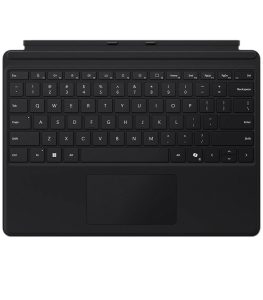
The Microsoft Surface Pro Keyboard for Pro 8, 9, and 11, identified by model number EP2-00425, is a premium accessory that combines style, functionality, and innovation into a compact form factor. Designed specifically for the latest iterations of the Surface Pro series, this keyboard delivers a seamless typing experience and full compatibility with Surface Pro 8, Surface Pro 9, and Surface Pro 11 devices. The keyboard magnetically attaches to the Surface Pro, transforming the tablet into a full-functioning laptop. With this universal fit across three generations, users benefit from the confidence of knowing their investment in the keyboard will serve them across multiple devices if they choose to upgrade within the Surface Pro family. It also supports the Microsoft Surface Pro Signature Keyboard configurations, including support for the Surface Slim Pen 2, which can be housed and charged magnetically in the integrated slot, making this keyboard not just a typing tool, but a central component of the entire Surface Pro experience.
Build Quality and Materials
The build quality of the Surface Pro Keyboard is nothing short of premium. Constructed with a soft yet durable Alcantara material, which Microsoft has long used for its Signature accessories, the keyboard offers a rich tactile feel that’s both soft to the touch and resistant to wear and tear over time. The fabric not only gives the keyboard a refined appearance but also adds a level of comfort when typing or resting your hands during long sessions. Despite its slim profile, the keyboard is highly durable and sturdy enough for professional-grade use. The magnetic strip that attaches the keyboard to the Surface Pro device is strong and ensures a secure connection, reducing the chance of accidental detachment during movement or use. Furthermore, the keyboard is spill-resistant and easy to clean, a welcome feature for users who work in dynamic environments.
Keyboard Layout and Typing Experience
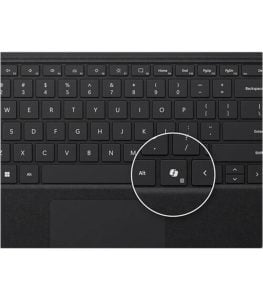
Typing on the Microsoft Surface Pro Keyboard for Pro 8, 9, and 11 feels remarkably close to using a traditional laptop keyboard. It features a full QWERTY layout, complete with function keys, media controls, and a Windows shortcut row that enhances productivity. Each key is backlit with adjustable brightness, which allows for comfortable use in varying lighting conditions—from bright offices to dimly lit conference rooms or home workspaces at night. The key spacing is well-balanced, providing enough room for accurate keystrokes, while the travel distance and tactile feedback deliver a satisfying typing feel that rivals many high-end laptops. The keys themselves are responsive and quiet, ideal for work in shared or quiet spaces. The magnetic hinge allows the keyboard to tilt slightly when connected, providing an ergonomic typing angle that reduces wrist strain. Whether you’re writing emails, coding, or taking notes in a lecture, the typing experience is precise and comfortable.
Trackpad Performance
Beneath the keyboard is a large precision glass touchpad that supports Windows Precision Drivers, allowing for smooth, responsive tracking and gesture support. Users can swipe, scroll, pinch to zoom, and use multi-finger gestures to navigate Windows 11 with ease. The touchpad’s surface is sleek and accurately interprets touch inputs, while its mechanical click mechanism provides consistent feedback. The high sensitivity of the touchpad makes it suitable for everything from casual browsing to detailed work like photo editing. Its placement below the spacebar is intuitive and ergonomic, and it’s sized just right to ensure ease of use without overwhelming the compact form factor of the keyboard itself.
Pen Support and Integration
One of the standout features of this Surface Pro Keyboard model is its seamless integration with the Surface Slim Pen 2. The keyboard includes a built-in, concealed charging cradle for the Slim Pen 2, allowing the stylus to be securely stored and wirelessly charged when not in use. This feature ensures the pen is always ready to go and eliminates the need for external charging solutions or carrying an additional pen holder. The integration is not only practical but smartly designed: the pen slot sits flush with the keyboard surface, maintaining a sleek profile while providing quick access to the stylus when needed. Creative professionals, students, and note-takers alike will appreciate the convenience of having the pen within easy reach at all times. The keyboard’s design fully supports the pen’s haptics and pressure sensitivity, making it a perfect companion for drawing, signing documents, and writing by hand directly on the Surface Pro screen.
Portability and Versatility
This keyboard shines when it comes to portability and versatility. As a detachable accessory, it adds minimal bulk to the Surface Pro while dramatically expanding its capabilities. When folded back, the keyboard automatically disables key input, allowing users to use the device in tablet mode without accidental keystrokes. It also serves as a screen protector when closed, safeguarding the display from scratches and smudges during transport. The slim and lightweight design makes it ideal for users who are constantly on the go, such as remote professionals, students, and travelers. Combined with the Surface Pro’s long battery life and portability, this keyboard helps turn your device into a truly mobile workstation.
Aesthetic Appeal and Color
The EP2-00425 model is presented in a classic black finish, offering a timeless and professional aesthetic that blends well in both casual and corporate environments. The black color minimizes visible fingerprints and smudges, keeping the keyboard looking clean and elegant even with frequent use. The Alcantara material has a matte, suede-like finish that adds to the sophisticated look while remaining subtle and understated. This design aesthetic makes the keyboard a great match for any Surface Pro device regardless of color and aligns perfectly with users who prefer a minimalist yet premium look.
Connectivity and Setup
Connecting the keyboard is effortless thanks to its magnetic attachment mechanism and proprietary Surface Connect interface. No Bluetooth pairing is needed—just snap the keyboard into place, and it’s ready to use. This plug-and-play convenience ensures zero lag and full responsiveness immediately. The power and data connection are direct and physical, which means you get a more stable experience than many wireless keyboards. The keyboard also draws power directly from the Surface Pro, eliminating the need for separate charging or batteries, simplifying the accessory ecosystem and reducing the need for carrying chargers and cables. Setup is instant, and the keyboard is automatically recognized by Windows without needing to install additional drivers or software.
Security and Privacy
In today’s increasingly connected world, privacy is more important than ever. While the keyboard itself does not include biometric security features like a fingerprint scanner, it is fully compatible with Windows Hello through the Surface Pro’s built-in IR camera and facial recognition. For users who prefer or require keyboard-based sign-in, it supports secure password and PIN input methods. When closed, the keyboard also acts as a privacy shield, protecting the screen from prying eyes and accidental touch input. The physical cover design provides peace of mind during travel, commutes, or in shared spaces like classrooms and co-working offices.
Productivity and Software Integration
This keyboard is built to enhance productivity, especially when paired with Windows 11. With dedicated function keys for volume control, screen brightness, media playback, and quick access to settings like Windows Search, Task View, and Snip & Sketch, the Surface Pro Keyboard offers shortcuts that save time and streamline workflows. Additionally, the keyboard’s responsive performance ensures minimal delay when working across demanding apps like Microsoft Office Suite, Adobe Creative Cloud, Visual Studio, or even remote desktop environments. The full layout supports multitasking, and thanks to its compatibility with Surface Dock and external displays, you can easily use it in a dual-screen or multi-peripheral setup.
Durability and Longevity
Built to Microsoft’s high standards, the EP2-00425 keyboard is engineered to withstand daily use. The keys are tested for long-term durability, and the Alcantara fabric is designed to resist wear while still feeling soft and pleasant. Microsoft claims the material has been treated for easy cleaning and increased longevity, meaning users don’t have to worry about the keyboard wearing out after months of intensive use. Whether you’re typing emails all day, using it as a digital sketchpad with the Slim Pen 2, or carrying it from meeting to meeting, the Surface Pro Keyboard holds up under pressure. It’s also built to support firmware updates via Windows Update, ensuring future compatibility and performance optimizations.
User Demographic and Use Cases
 This keyboard is ideal for a wide range of users. Business professionals who need a lightweight, reliable keyboard for presentations, note-taking, and document editing will appreciate its portability and premium features. Students will find it incredibly useful for taking notes in class, collaborating in group projects, or researching online. Creative professionals like graphic designers, illustrators, and video editors will love the pen integration and the smooth, accurate trackpad. Even casual users who simply want a reliable keyboard for browsing the web, typing emails, or streaming content will benefit from the improved comfort and functionality over the on-screen keyboard. It is also a great fit for remote workers who frequently shift between home, office, and travel environments.
Environmental Considerations and Packaging
Microsoft has made a commitment toward sustainability, and the Surface Pro Keyboard aligns with these values. The packaging is minimal and mostly recyclable, with clear labeling for responsible disposal. The Alcantara material used in the keyboard is produced using an environmentally conscious process and has received certification for its sustainability practices. While electronics inherently have an environmental footprint, this keyboard is designed for longevity and reusability, potentially reducing the need for frequent replacements or upgrades. Users looking to minimize waste can rest assured that this product is built with some regard for the planet.
the Microsoft Surface Pro Keyboard for Pro 8, 9, and 11 (EP2-00425) is more than just a keyboard—it is a vital productivity tool that brings out the full potential of your Surface Pro device. With a sleek, modern design, Alcantara fabric finish, responsive keys, precision touchpad, and integration with the Surface Slim Pen 2, it enhances the user experience whether you’re working, studying, creating, or just browsing. Its seamless connection, durable construction, ergonomic design, and intuitive layout make it one of the best accessories for Surface Pro users. The black colorway adds a touch of professionalism and pairs well with all device colors, while the thoughtful inclusion of shortcut keys, magnetic attachment, and dual-purpose use as a screen cover adds layers of practicality. Whether you’re a seasoned professional, a digital nomad, a student, or a creative visionary, this keyboard is built to support your lifestyle, your workflow, and your future with Surface.